Why should you choose to receive your bank statements through The Farmers Bank SMART Online Banking?
It’s convenient – receive an email letting you know you may view, download, save, and print your e-statement anytime, anywhere.
It’s safe – your eStatement will not be lost or stolen in the mail.
It’s fast – your eStatement is available days before your paper statement.
It’s environmentally friendly – reduce paper waste and make a tree near you very, very happy.
It’s free!
To sign up for eStatements, you will need to log into SMART Online Banking at www.thefarmersbank.com. The service is free and available for checking and savings accounts to all SMART Online Banking customers.
Note: If you are not yet a SMART Online Banking customer, you will need to sign-up for SMART Online Banking before you can enroll in eStatements.
It’s Quick to Sign Up:
- Log in to SMART Online Banking or download the SMART Online Banking App.
- Choose Menu, Services, then select eStatement Enrollment.
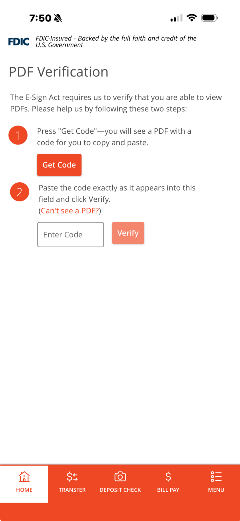
- PDF Verification will be required to complete eStatement Enrollment.
- Press "Get Code" - you will see a PDF with a code for you to copy and paste.
- Paste the code exactly as it appears into the field and click Verify.
-
- Click the edit 'pencil' icon to change from paper statement to eStatement.
- Click to accept the service agreement.
- You'll be able to view your eStatements in 'Services' under 'eDocument' when the next statement is printed.
Important
- Once you're signed up to receive eStatements, you will receive an email each time a new statement is available.
- If you choose eStatements, and any statements were previously bundled with another checking or savings account, the statements will then be delivered separately.
- eStatement requests from any owner/signer/Administrator will be accepted as the customer's statement delivery choice on behalf of all owners/signers/Administrators, and paper statements will be discontinued.
- Statements will be available in the eDocuments Center for up to 12 months.
eStatements Frequently Asked Questions
Is there a fee to sign up for eStatements?
No, eStatements free!
Which accounts are eligible for eStatements?
All checking and savings accounts offer eStatements. Certificates of Deposit and loans do not have eStatement functionality at this time.
Do I have to be an Online Banking customer to receive an eStatement?
Yes, eStatements are available through SMART Online Banking only.
How will I know when my eStatements are ready?
You will receive an email each time a new statement is available to view.
How many eStatements are available for me to view online?
eStatements will be available in your online archive for 12 months.
Will my eStatement look the same as my paper statement?
Yes, your eStatements will be similar to the paper statements you currently receive.
Can I receive both paper statements and eStatements?
No, once you have completed the enrollment process for eStatements, paper statements are no longer produced for your account.
How do I view my eStatement? What software do I need?
To view your eStatement, simply sign in to SMART Online Banking, then choose menu, under the 'Accounts tab' (personal users) or 'View eStatements' under the 'Reports' tab (business users). Once enrolled, you can view up to 12 months of eStatements! You will need Adobe Reader to view your statement. If you do not have Adobe Reader, you can download the software for free at
http://get.adobe.com/reader/.